Saturday, December 24, 2016

Link to open in new window target attribute & image link - HTML5 - Web Development

Link that open in new window


How to make link to open in new window?

We had seen in before page that how to make a link. Good!. If you click that link it will open in same window in your browser. But if you want to open that link in new window there is an attribute. That is called ' target="_blank" ' attribute.

Example:

Free Ads | Insurance | Loan | Credit | Hosting

If you click the link it will open my one of website named http://www.freeadsimple.com in new window.

How the code of the link is :

<a href="http://www.freeadsimple.com/" target="_blank">Free Ads | Insurance | Loan | Credit | Hosting</a>

Just try in your computer for the above code in body of web page.

It will give you a link to open in new window

How to give link to an image


If you want to give link to image you will try this statement:


<a href="http://www.freeadsimple.com">
 <img src="free-ad-simple.jpg" alt="Free Advertisement without registration" style="width:350px;height:200px;border:0">
</a>

In the above example we should give image display statement in between the href attribute start and end.


Example code :

<!DOCTYPE html>
<HEAD>
<TITLE>Web Development Example</TITLE>
<meta charset="UTF-8">
</HEAD>
<BODY>

<a href="http://www.freeadsimple.com">
<img src="free-ad-simple.jpg" alt="Free Advertisement without registration" style="width:350px;height:200px;border:0">
</a>


</BODY>
</html>

Output of above code is:
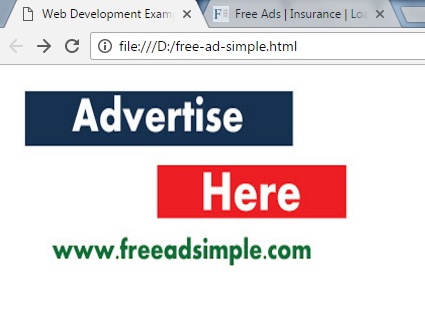


In the above output you can see an image. If you bring your cursor there It will show hyperlink cursor when mouse over on it. And you can click that image to open http://www.freeadsimple.com website.

Thank you for reading. Will meet in next chapters.


Friday, December 23, 2016

HTML Links - How you put link in your webpage? - Web Develpment

Links in HTML

How you put link to another page from your current page? The link is interconnection between two pages. If user click the link from a page it will redirect to another page.

Example:

Google Link

If you click above link it will go to www.google.com web page. Because I put link in this page to google.com web page.

Ok let us see, how we will put in links in our web pages.

Format for link :

<a href="link_page_URL">Text to display</a>

Example for link :

<a href="www.google.com">Google Link</a>

Like above you can put link in your code

Put together in your code:


<!DOCTYPE html>
<HEAD>
<TITLE>Web Development Example</TITLE>
<meta charset="UTF-8">
</HEAD>
<BODY>

<a href="www.google.com">Google Link</a>


</BODY>
</html>


Output of above code look like:


Practice yourself in your computer. Will meet in next pages. Thank you.


Comments in HTML - Web Development

Comments in HTML

Sometimes we need to put comments in your HTML code. It will not executed when operating our codes. It will be a hints to know about code blocks.

It starts with <!-- and ends with --> inside texts will not be executed at run time.

Format :

<!--Comments Here -->


Example :

<!--Paragraph about description about this web page -->

Example codes:

<!DOCTYPE html>
<HEAD>
<TITLE>Web Development Example</TITLE>
<meta charset="UTF-8">
</HEAD>
<BODY>

<!--Heading -->
<h1 style="text-align:center;color:green;" title="This is heading tooltip">Heading</h1>


<!-- Paragraph --><p style="text-align:center;color:red">Hi! Greetings. I am a paragraph with red colored text and centered.</p>


<!--This is a href attribute explantion --><a href="http://www.freeadsimple.com">Post Free Ads</a>


<!-- Alt attribute example --><img src="world.jpg" alt="free-ads-world" width="50" height="50">


</BODY>

</html>

Those are comments which are in blue color text in above example. Those comments for only hints for programmer.


Thank you for reading Our blog.... Will continue further.


HTML superscript and subscript Texts - Web Develpment

Superscript and subscript in HTML

If you want to use formulas in your web pages, Sometimes you should use square or cube signs in your formulas like A2. So you need to use superscript or subscript symbols in your web pages. For superscript the elements <sup></sup>, for subscript the elements <sub></sub> are using for these formula options

Example:

<p>a<sup>2</sup> + b<sup>2</sup> + 2 a b = (a+b)<sup>2</sup></p>

Example code for webpage :

<!DOCTYPE html>
<HEAD>
<TITLE>Web Development Example</TITLE>
<meta charset="UTF-8">
</HEAD>
<BODY>

<p>a<sup>2</sup> + b<sup>2</sup> + 2 a b = (a+b)<sup>2</sup></p>


</BODY>

</html>

Result of the above code:


Thank you to reading my blog. Manikandan. Will meet you in coming pages. If you have any doubt please comment in this blog, I will reply for your questions.


HTML style property - Web Development

Style Property in HTML

HTML style property is CSS property you can change font, colors, background colors, text size using this property.

Format  of style property :

<tagname style="property:value;">


example for paragraph :


<p style="background-color:blue;font-size:20px;color:white;">Hi!. This is paragraph text using style property.Background color light blue and text color is white. font size is 20 px.</p>

example of property in a web page :


<!DOCTYPE html>
<HEAD>
<TITLE>Web Development Example</TITLE>
<meta charset="UTF-8">
</HEAD>
<BODY>


<p style="background-color:blue;font-size:20px;color:white;">Hi!. This 

is paragraph text using style property. Background color blue and text 

color is white. font size is 20 px.</p>


</BODY>
</html>


Result of above code:


Our some other useful websites :

To learn php - our php tutorial - http://learnandsharephp.blogspot.com/


To Post free ads - Our Free ads website - http://www.mapofmine.com and http://www.freeadsimple.com 

Thursday, December 22, 2016

HTML5 alt attribute - Web development Lessons

Alt Attribute
                               
                                                          Alt attribute represents alternative. You can give a text alternative for a image or link using this attribute. Why you need to give alt attribute for an image. When user search using search engine by text your image also will be listed by user's query.

For example :

<img src="world.jpg" alt="free-ads-world" width="50" height="50"

So its one of the method related to search engine optimization. If you want to better result when search users please use alt attribute related to your website.

Better result you can use as lower case letters in alt attribute.


Example code:

<!DOCTYPE html>
<HEAD>
<TITLE>Web Development Example</TITLE>
<meta charset="UTF-8">
</HEAD>
<BODY>

<h1 style="text-align:center;color:green;" title="This is heading 

tooltip">Heading</h1>

<p style="text-align:center;color:red">Hi! Greetings. I am a paragraph 

with red colored text and centered.</p>

<a href="http://www.freeadsimple.com">Post Free Ads</a>

<img src="world.jpg" alt="free-ads-world" width="50" height="50">


</BODY>
</html>


All other attributes are

id, disabled, style, title represents unique Id for a thing,  disable, to represent style or title.

Thank you for reading.... Will continue HTML5 in next pages.....


HTML5 attributes Continue - Web Development Lessons


Ok. Let us see next part of attributes.

Size Attributes :
                              File size and image size are provide by size attributes.

format of size attributes:

<img src="world.jpg" width="50" height="50">

The above example means "world.jpg" image file will be displayed in your page 50 screen pixel width and 50 screen pixel height.


Example for above :

<!DOCTYPE html>
<HEAD>
<TITLE>Web Development Example</TITLE>
<meta charset="UTF-8">
</HEAD>
<BODY>

<h1 style="text-align:center;color:green;" title="This is heading 

tooltip">Heading</h1>

<p style="text-align:center;color:red">Hi! Greetings. I am a paragraph 

with red colored text and centered.</p>

<a href="http://www.freeadsimple.com">Post Free Ads</a>

<img src="world.jpg" width="50" height="50">

<img src="world.jpg" width="100" height="100">

</BODY>
</html>

Output of above HTML code :


Here I displayed same file "world.jpg" in two sizes. One is 50x50 and 100x100. Please try in your computer for this attributes.

Thank you for continue reading....